 TierCanvas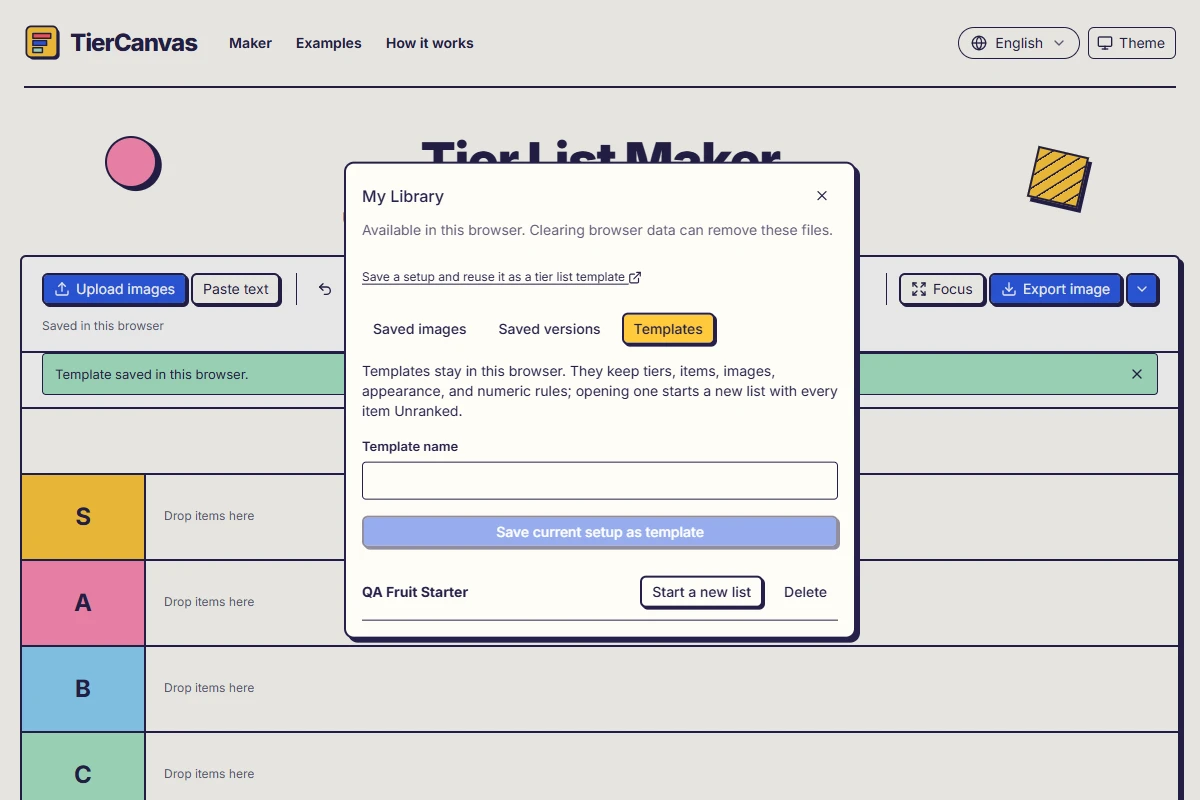
Choose a draft, a version, or a template
These three features solve different problems. The current draft lets you return to the board you were editing. A saved version keeps a result you want to revisit without overwriting it. A template keeps a reusable starting setup so you can rank the same objects again. Saving a template does not rearrange the board currently on screen.
- Current draft: the maker's automatically saved working board, when browser storage is available.
- Saved version: a snapshot of the ranking, including the positions you chose. Open a copy to continue without changing that saved result.
- Reusable template: your tiers, text and image items, appearance, and numeric rules. Starting from it creates a new list with every item Unranked.
Prepare a starting setup worth keeping
For a recurring fruit-tasting session, add Apple, Banana, and Mango using Paste text, or upload your own pictures. Rename the tiers for the question you want to answer, such as how much you enjoyed each fruit. This is a personal preference exercise, not an official nutrition or health ranking.
A three-item starting list
Apple
Banana
Mango
Expected result: Paste with New line selected, then add the three items. Set up your tiers before saving the template. The names are reusable candidates, not a preselected winning order.
If you use a numeric property and tier ranges, check them before saving too. The template can carry that setup into the next list. It does not refresh game statistics, look up new values, or decide whether an old measurement is still valid; you remain responsible for updating the inputs and checking the range preview.
Save the template in My Library
- Open My Library in the workbench toolbar and select Templates.
- Enter a useful Template name, such as Fruit tasting starter.
- Choose Save current setup as template and wait for the saved confirmation.
- Keep editing your current board, or use the saved template when you next want a fresh ranking.
Choose a name that describes the reusable set and purpose. You can save templates with the same name; doing so creates distinct entries rather than silently overwriting an older setup. If a set has changed significantly, use a clear new name so you can tell the versions of your starting material apart.
Start a new list from the template
- Return to My Library → Templates in the same browser profile.
- Find your template and choose Start a new list.
- If the maker asks about the current board or unapplied edits, keep them or discard them deliberately. Do not dismiss the choice without checking what you need.
- Check that the expected tiers and three fruit items are present. The items begin in Unranked, ready for your new decisions.
- Rank the items and name the result. Use Export image to preview it and Download as PNG, WebP, or JPG. If you changed export content or sizing, choose Apply or Download before saving a template or version.
A template starts a fresh ranking with its items in Unranked. Saved versions → Open a copy restores a previous arrangement instead. Both retain the export settings saved with them, including source, note, signature, and sizing; unapplied changes in an open export panel are not silently saved.
Change or remove a reusable setup safely
To make a revised starting setup, open the template, edit the tiers or items you need, and save another template. The saved original remains separate. Updating an item's numeric value or picture framing changes the current list; it does not make every previously saved result change with it.
Delete in the Templates tab asks for confirmation and removes that template entry. Its images remain in the library. Deleting a template is not an image-library cleanup tool and should not be used as one. Check the entry's purpose before confirming, especially if you have used similar names.
Know what local saving can and cannot protect
Templates, images, drafts, and saved versions belong to this browser's storage. They do not follow you to another device or a different browser profile, and there is no account-based cloud library. Clearing site data or browser storage cleanup can remove them. A PNG, WebP, or JPG download keeps a picture of a result; it is not an editable template backup.
If saving fails, keep the current page open and retain any result you can download. Use Retry saving after checking storage availability. Do not clear this site's data as your first troubleshooting step: that can remove the local work you are trying to recover. Contact support with reproduction steps rather than private pictures or ranking text.